
Quick Summary
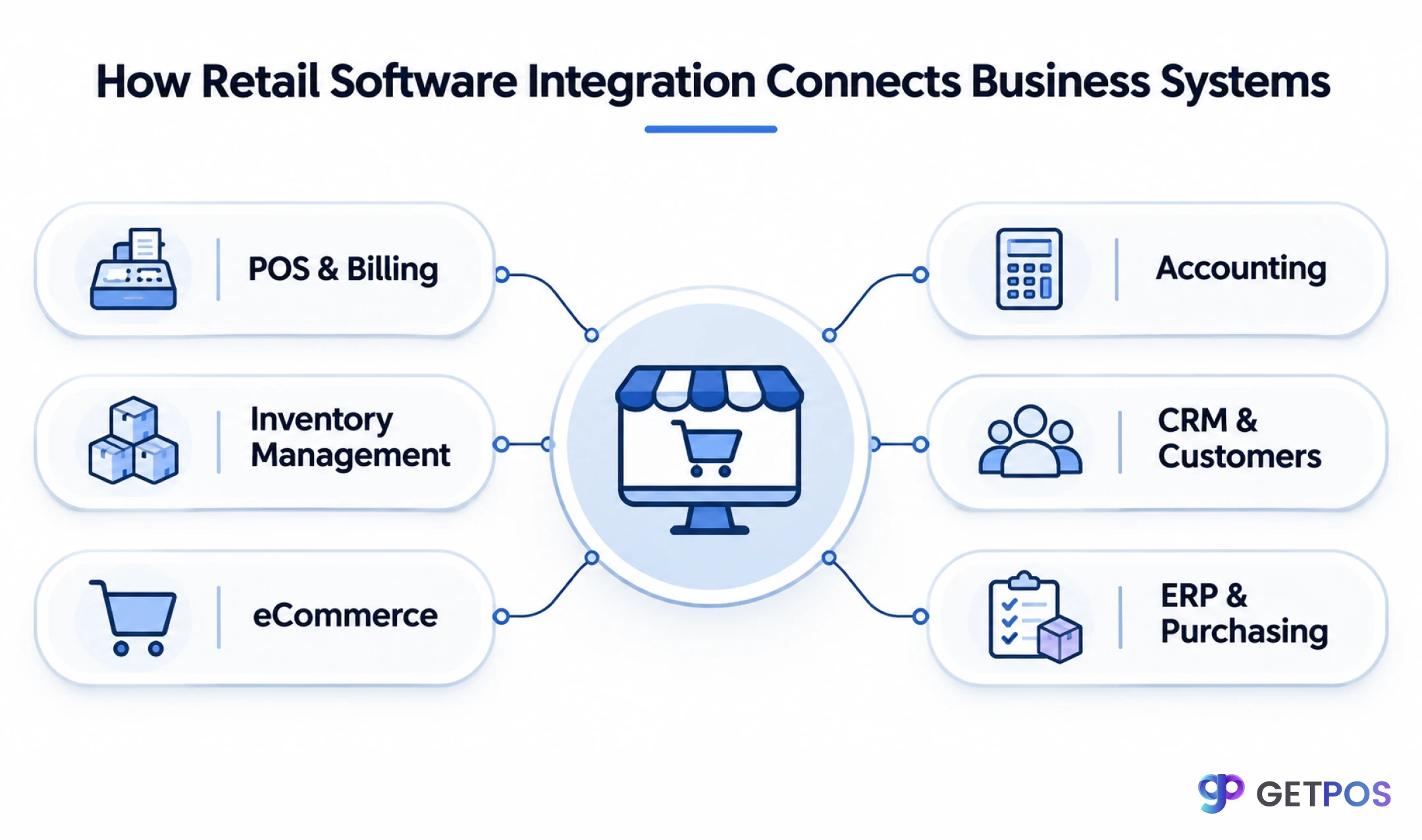
Retail software integration connects different applications, such as billing, inventory, accounting, ERP and eCommerce, so they can share information automatically. It helps retailers reduce manual data entry, avoid stock mismatches, process orders faster and monitor business performance. By connecting everyday operations, retailers can manage their stores more efficiently and prepare their businesses for future growth.
Table Of Contents
Introduction
Imagine managing your store’s sales in one application, inventory in another, and accounting through spreadsheets. Every time a product is sold, someone has to update stock, check records and share information with other departments. This creates unnecessary work and increases the chances of mistakes. Retail software integration connects these separate applications, allowing information to move between them automatically. In this guide, we explain how it works, which systems retailers should connect and how to choose the right solution for their business.
For retailers looking to connect core operations in one platform, explore the retail analytics solution to see how sales, inventory and performance information can be brought into a clearer business view.
Key Takeaways
Connect billing, inventory, accounting, ERP and eCommerce applications so relevant information can move between systems.
Reduce repeated data entry and manual updates by automating clearly defined workflows.
Improve stock visibility by connecting sales, purchases, returns and stock transfers.
Check compatibility, synchronization frequency, data ownership, security and error handling before implementation.
Choose integrations based on current operational problems and the retailer's plans for future growth.
What Is Retail Software Integration?
Retail software integration is the process of connecting two or more applications so they can exchange information and work together. It allows different retail systems to share data without requiring employees to enter the same information repeatedly.
For example, when a customer purchases a product, the billing system records the transaction. A configured integration can then send relevant information to inventory, sales reporting and accounting applications. Without integration, employees may need to update each application separately. With integration, information moves between connected systems according to predefined rules.
Retail applications commonly connect through APIs (Application Programming Interfaces), webhooks, middleware or pre-built connectors. The right method depends on the applications involved, the information being exchanged and how frequently updates are required.
Why Do Retail Businesses Need Software Integration?
Many retail problems do not happen because businesses lack software. They happen because the applications they use do not communicate with one another. A retailer may have a billing system, an inventory application, accounting software and an online store, but employees still have to transfer information between them.
Inventory records do not match actual stock
A product is sold at the counter, but the inventory record remains unchanged because the billing and stock systems are separate.
How integration helps: Connecting billing and inventory allows completed sales to update stock records according to configured rules.
Employees repeat the same data entry
Staff enter sales, product or supplier information into multiple applications, increasing effort and the chance of mistakes.
How integration helps: Integration can transfer approved information between systems and reduce repetitive administration.
Managers cannot see the full business picture
Sales, stock and finance reports sit in separate applications, making it harder to understand overall performance.
How integration helps: Connected reporting can bring relevant information together for a more complete operational view.
Online and store stock do not match
A product sells in-store but remains available on the website because the channels are not sharing stock updates.
How integration helps: An eCommerce and inventory connection can synchronize availability, subject to reservation and update rules.
Multi-store coordination becomes difficult
Each outlet maintains separate records, making stock transfers and performance comparisons harder.
How integration helps: Centralized systems can give authorized managers visibility across locations and support coordinated workflows.
7 Types of Retail Software Integrations Every Retailer Should Know
Not every retailer needs every integration. A single-store business may have different requirements from a chain operating several outlets, warehouses and online channels. Start with the connections that solve the most time-consuming or costly operational problems.
1. POS and Inventory Management Integration
Connects billing transactions with stock records. When a product is sold, the relevant quantity can be adjusted in the inventory system. For example, a footwear retailer selling two pairs in size 8 can have those units deducted from the configured stock location. This helps teams monitor availability, identify low-stock products and plan replenishment. Verify how the integration handles returns, exchanges, cancelled bills and offline transactions.
2. POS and Accounting Integration
Transfers relevant sales and payment information into accounting records. Depending on configuration, the data may include sales totals, taxes, discounts, refunds and payment methods. Ask how the integration maps tax rates, ledgers, payment settlements and refunds. Test a sample day of transactions and compare the source records with the accounting entries before relying on automated posting.
3. eCommerce and Inventory Integration
Connects online product availability and orders with inventory records. When an online order is placed, the integration may reserve or deduct stock and pass order details to fulfilment. Check whether the connector supports multiple warehouses, cancellations, partial fulfilment, returns and stock buffers. These details matter because a basic stock sync may not cover the full order lifecycle.
4. ERP and Retail Software Integration
Shares information between store operations and broader business processes such as procurement, finance and inventory. For example, goods received at a warehouse may update stock records and provide receiving information to purchasing or finance workflows. Confirm which system owns product, supplier, purchase and financial records to prevent conflicting updates.
5. CRM and Customer Management Integration
Shares permitted customer details and purchase activity across retail and customer-management applications. This can help maintain customer profiles, purchase histories and loyalty information. Check consent, data permissions, duplicate customer handling and which fields are synchronized. Only transfer information that the business has a legitimate reason and permission to use.
6. Payment Gateway and Billing Integration
Connects payment processing with the billing application. When a customer pays by card, UPI or another supported method, the payment status can be returned to the billing workflow. Test successful and failed payments, refunds, reversals, settlement references and reconciliation reports. A payment approval should not be treated as a completed settlement unless the workflow confirms it.
7. Warehouse and Supply Chain Integration
Connects receiving, dispatch, stock transfers and warehouse movements with retail inventory records. For example, when a central warehouse dispatches goods to a store, the system can record the transfer and update stock at the appropriate stages. Confirm whether the integration tracks dispatch, in-transit and receipt separately, and how discrepancies are handled.
Retailers exploring a broader platform approach can review a connected Retail Operating System that brings core retail functions together.
How Does Retail Software Integration Work? A Real-World Example
Imagine a clothing retailer with three outlets, one central warehouse and an online store. A customer buys a shirt at Store A. The billing application records the sale, and the configured integration sends the transaction details to the inventory system. The stock quantity for that store is adjusted, sales reporting receives the transaction, and relevant financial information can be passed to accounting.
Step | What happens | System response |
|---|---|---|
1. Sale | Customer buys a shirt. | POS records the transaction. |
2. Stock | Sale information is sent to inventory. | Relevant stock quantity is updated. |
3. Reporting | Transaction reaches reporting. | Managers can review sales information. |
4. Finance | Configured financial data is transferred. | Accounting records are updated. |
5. Replenishment | Stock reaches a defined threshold. | An alert or purchasing workflow may be triggered. |
The important point is that each system has a defined role and the integration transfers only the information required for the next step. Retailers should test the complete workflow, including failed updates, returns and corrections, before deploying it across all locations.
How Connected Systems Solve Everyday Retail Problems
Improve stock visibility
When sales, purchases and stock movements are connected, managers can see more consistent inventory information and identify where products are available. This supports better replenishment and transfer decisions. Retailers can build on this with practical retail inventory management practices such as stock reconciliation, ageing reviews and reorder checks.
Reduce repetitive work
Automated data transfer can reduce the need to copy transaction or product details into multiple applications. The exact tasks that can be automated depend on the connector and business rules. Review retail automation workflows to understand how recurring activities such as reordering and stock transfers can be coordinated.
Coordinate multiple stores
A connected system can help head-office teams compare store information, monitor stock and coordinate transfers. It is especially useful when product availability and reporting need to be reviewed across several outlets. Retailers can explore multi-store retail management for centralized visibility across locations.
Support faster decisions
When relevant sales and stock information is available in one place, managers can investigate changes sooner. For example, they can compare store-level sales with available stock before deciding whether to transfer products or place a new order.
Common Challenges in Retail Software Integration
Challenge | Why it happens | What to check |
|---|---|---|
Data mismatch | Applications use different product codes or formats. | Standardize SKUs, IDs, locations and field formats. |
Compatibility | An application may not expose the required API or connector. | Confirm supported versions, APIs and connector limits. |
Sync delays | Updates may be scheduled or queued. | Agree on required update frequency and monitor failures. |
Duplicate or missing records | Retries and mapping rules may be incomplete. | Test duplicate handling, retries and reconciliation. |
Security and access | Connected applications exchange business data. | Review authentication, permissions, logs and data handling. |
Unexpected costs | Custom work and maintenance add to the initial fee. | Compare setup, support, maintenance and change costs. |
Before implementation, decide which application is the source of truth for each data type. For example, inventory software may own stock quantities while accounting software owns ledger records. Clear ownership reduces the risk of two systems overwriting each other’s information.
How to Choose the Right Retail Integration Solution
1. List the systems you already use
Write down your billing, inventory, accounting, ERP, CRM, eCommerce and warehouse applications. Include versions and any custom workflows.
2. Identify the problem you want to solve first
Prioritize issues such as stock mismatches, duplicate data entry, delayed reports or order errors. Avoid connecting applications simply because a connector exists.
3. Verify compatibility and data mapping
Ask whether the connection uses a pre-built connector, API or custom development. Confirm how products, stores, tax codes, customers and transactions are matched.
4. Confirm synchronization and error handling
Ask how often information moves, how failed updates are reported, whether retries occur and how duplicate records are prevented.
5. Review security and access
Check authentication, user permissions, audit trails, data retention and the responsibilities of each vendor.
6. Test a complete workflow before rollout
Ask the vendor to demonstrate a real scenario using sample data: complete a sale, update stock, process a return and review the resulting reports. Record any gaps before expanding the integration.
Is an Integrated Retail System Better Than Separate Software?
Area | Separate applications | Connected approach |
|---|---|---|
Data | May require manual transfer or separate sync jobs. | Can share agreed data through integrations. |
Workflows | Teams may switch between tools. | Related tasks can be coordinated across systems. |
Reporting | Information may need to be consolidated. | Connected data can support consolidated reporting. |
Flexibility | Retailer can choose specialized tools. | Can retain external tools while connecting key workflows. |
Management | More vendor relationships may be needed. | A unified platform may reduce system fragmentation. |
An integrated approach does not mean every external application must be replaced. Some retailers may keep specialist accounting, payment or eCommerce tools and connect them to their core retail platform. Others may prefer a unified system where major retail functions already work together. Choose the model that fits the business process, data requirements and total cost.
Conclusion
Managing separate applications for billing, inventory, purchasing and accounting can make everyday retail operations harder than they need to be. Retail software integration helps these applications share information and support connected workflows. Before choosing a solution, identify the operational problems you need to solve, verify compatibility, understand synchronization and error handling, and compare the full implementation cost. If you want to bring core retail functions together, explore GETPOS and assess whether its connected Retail Operating System fits your stores, workflows and growth plans.
Frequently Asked Questions
Retail software integration connects applications such as billing, inventory, accounting, ERP and eCommerce so they can exchange relevant information. It reduces repeated data entry and helps retailers coordinate everyday operations.
Start with the applications linked to the biggest operational problem. For many inventory-led retailers, connecting billing and inventory is a practical first step. Accounting, eCommerce and purchasing integrations can follow as needed.
When billing and inventory systems are connected, completed sales can update stock records according to configured rules. Retailers should also test returns, cancellations, offline sales and stock transfers.
Yes. Connected systems can share sales, inventory and purchasing information across locations. Centralized reporting and role-based access can help managers monitor outlets and coordinate stock movement.
Check compatibility, API or connector support, data mapping, synchronization frequency, error handling, security, vendor support and total cost. Test a complete workflow before rolling it out.