

Quick Summary
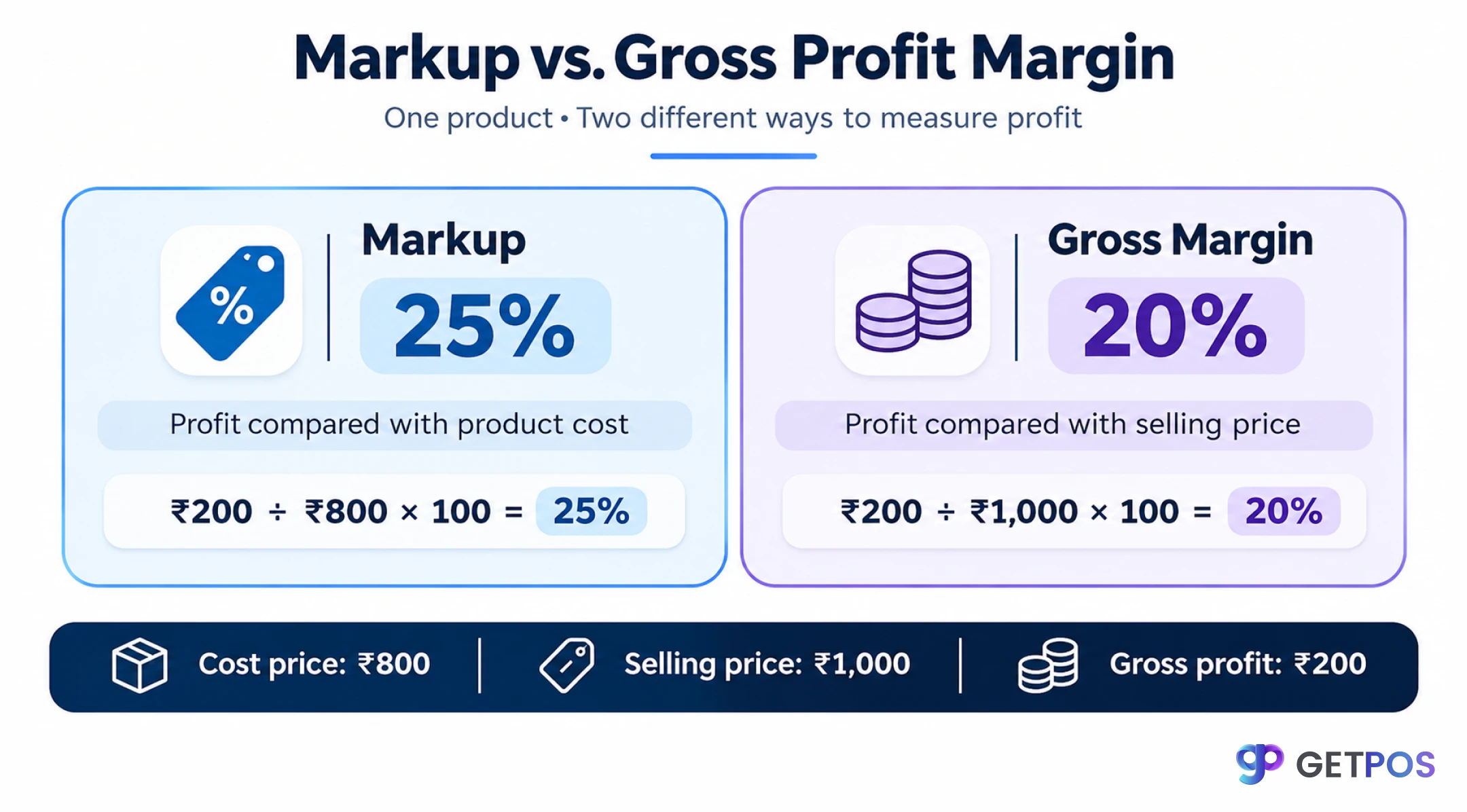
Markup and margin help retailers understand how much profit they make from selling products. Markup calculates profit against product cost, while margin calculates profit against selling price. For example, an ₹800 product sold for ₹1,000 generates ₹200 gross profit. This means 25% markup but only 20% gross margin. Understanding both helps retailers set accurate prices and avoid pricing mistakes.
Table Of Contents
Introduction
Imagine running a retail shop and purchasing a product for ₹800. You sell it for ₹1,000 and earn ₹200 in gross profit. But how much profit did you actually make? Is it 25% or 20%?
The answer depends on how you calculate it. This is where many shopkeepers confuse markup with margin. As a result, they sometimes set incorrect selling prices or offer discounts without understanding their actual profitability.
Understanding markup vs margin helps retailers price products correctly, control costs, and make better business decisions. Let’s understand both with simple formulas and practical Indian retail examples.
Key Takeaways
Markup measures profit against the product's cost price.
Margin measures profit against the product's selling price.
A 25% markup equals a 20% gross profit margin.
Discounts and additional costs can reduce actual profitability.
Accurate product costs help retailers make better pricing decisions.
1. What Is Retail Markup?
Retail markup is the additional amount a retailer adds to a product’s purchase cost to decide its selling price.
For example, you purchase a pair of shoes for ₹800. You add ₹200 to the cost and sell them for ₹1,000. Your markup is ₹200, which equals 25% of the purchase cost.
Retailers commonly use markup when pricing groceries, clothing, electronics, and other products.
Retail Markup Formula
Markup Percentage = (Selling Price − Cost Price) ÷ Cost Price × 100
How to Calculate Markup Percentage
Consider this simple example:
Calculation | Amount |
|---|---|
Product Cost | ₹800 |
Selling Price | ₹1,000 |
Gross Profit | ₹200 |
Markup Percentage | 25% |
Step-by-step calculation:
Selling price minus cost price = ₹200.
Divide ₹200 by ₹800 = 0.25.
Multiply 0.25 by 100 = 25%.
Therefore, your product has a 25% markup.
When should you use markup? Use markup when deciding how much to add to your product cost before selling it. However, remember that your markup must also support operating expenses and other business costs.
2. What Is Profit Margin in Retail?
Profit margin tells you how much of your selling price remains after deducting the product’s cost.
For example, you sell a product for ₹1,000 and its cost is ₹800. Your gross profit is ₹200. Now, divide that ₹200 profit by your selling price of ₹1,000. Your gross profit margin is 20%.
In simple words, margin shows how much gross profit you earn from every ₹100 of sales revenue.
Gross Profit Margin Formula
Gross Profit Margin = (Selling Price − COGS) ÷ Selling Price × 100
How to Calculate Retail Profit Margin
Calculation | Amount |
|---|---|
Cost of Goods Sold (COGS) | ₹800 |
Selling Price | ₹1,000 |
Gross Profit | ₹200 |
Gross Profit Margin | 20% |
Calculation: (₹200 ÷ ₹1,000) × 100 = 20%.
Important: Gross profit margin and net profit margin are different.
Gross Profit Margin: Measures profit after deducting the cost of goods sold.
Net Profit Margin: Measures profit after accounting for operating expenses and other relevant income and costs.
For example, rent, employee salaries, electricity, and marketing expenses affect your overall business profitability.
3. Markup vs Margin: What Is the Difference?
Markup and margin both measure profit, but they answer different questions.
Markup: How much have you added to the product's cost?
Margin: How much of the selling price do you retain as gross profit?
Let’s compare both using the same ₹800 product.
Factor | Markup | Margin |
|---|---|---|
Calculation Basis | Product Cost | Selling Price |
Formula | Profit ÷ Cost × 100 | Profit ÷ Sales × 100 |
Gross Profit | ₹200 | ₹200 |
Percentage | 25% | 20% |
Main Purpose | Setting product prices | Measuring profitability |
The biggest mistake is assuming both percentages are interchangeable. They are not. A 25% markup generates a 20% gross margin. Similarly, a 30% markup generates approximately 23.08% gross margin.
4. How to Convert Markup to Margin and Margin to Markup
Retailers sometimes calculate markup when they actually need to understand their gross margin. Fortunately, converting between these percentages is straightforward.
Markup to Margin Conversion
Margin (%) = Markup (%) ÷ (100 + Markup (%)) × 100
Example: Suppose your product has a 25% markup. 25 ÷ 125 × 100 = 20%. Therefore, a 25% markup equals a 20% gross margin.
Margin to Markup Conversion
Markup (%) = Margin (%) ÷ (100 − Margin (%)) × 100
Example: Suppose you want a 20% gross margin. 20 ÷ 80 × 100 = 25%. Therefore, you need a 25% markup.
Quick Markup to Margin Conversion Table
Markup | Equivalent Margin |
|---|---|
10% | 9.09% |
20% | 16.67% |
25% | 20.00% |
30% | 23.08% |
40% | 28.57% |
50% | 33.33% |
75% | 42.86% |
100% | 50.00% |
Use this table when reviewing product prices or comparing your pricing targets.
5. How to Calculate Selling Price Using Markup and Margin
Knowing your target profit percentage is useful. However, you also need to calculate the correct selling price. Let’s understand both methods using a product costing ₹1,000, excluding recoverable GST.
Method 1: Calculate Selling Price Using Markup
Selling Price = Cost Price × (1 + Markup Percentage ÷ 100)
Suppose you want a 30% markup. ₹1,000 × 1.30 = ₹1,300. Your selling price should be ₹1,300.
Method 2: Calculate Selling Price Using Target Margin
Selling Price = Cost Price ÷ (1 − Margin Percentage ÷ 100)
Suppose you want a 30% gross margin. ₹1,000 ÷ 0.70 = ₹1,428.57. Your selling price should be approximately ₹1,428.57.
Selling Price Comparison
Metric | 30% Markup | 30% Margin |
|---|---|---|
Product Cost | ₹1,000 | ₹1,000 |
Selling Price | ₹1,300 | ₹1,428.57 |
Gross Profit | ₹300 | ₹428.57 |
Gross Margin | 23.08% | 30.00% |
Which method should you use? Use markup when adding a percentage to your purchase cost. Use margin when deciding how much gross profit you want from your selling price.
GST Note: These examples use tax-exclusive figures. Exclude recoverable input GST from product costs and output GST from sales revenue. Include non-recoverable taxes in costs where applicable. Actual customer-facing prices depend on the applicable GST rate.
6. Common Retail Pricing Mistakes to Avoid
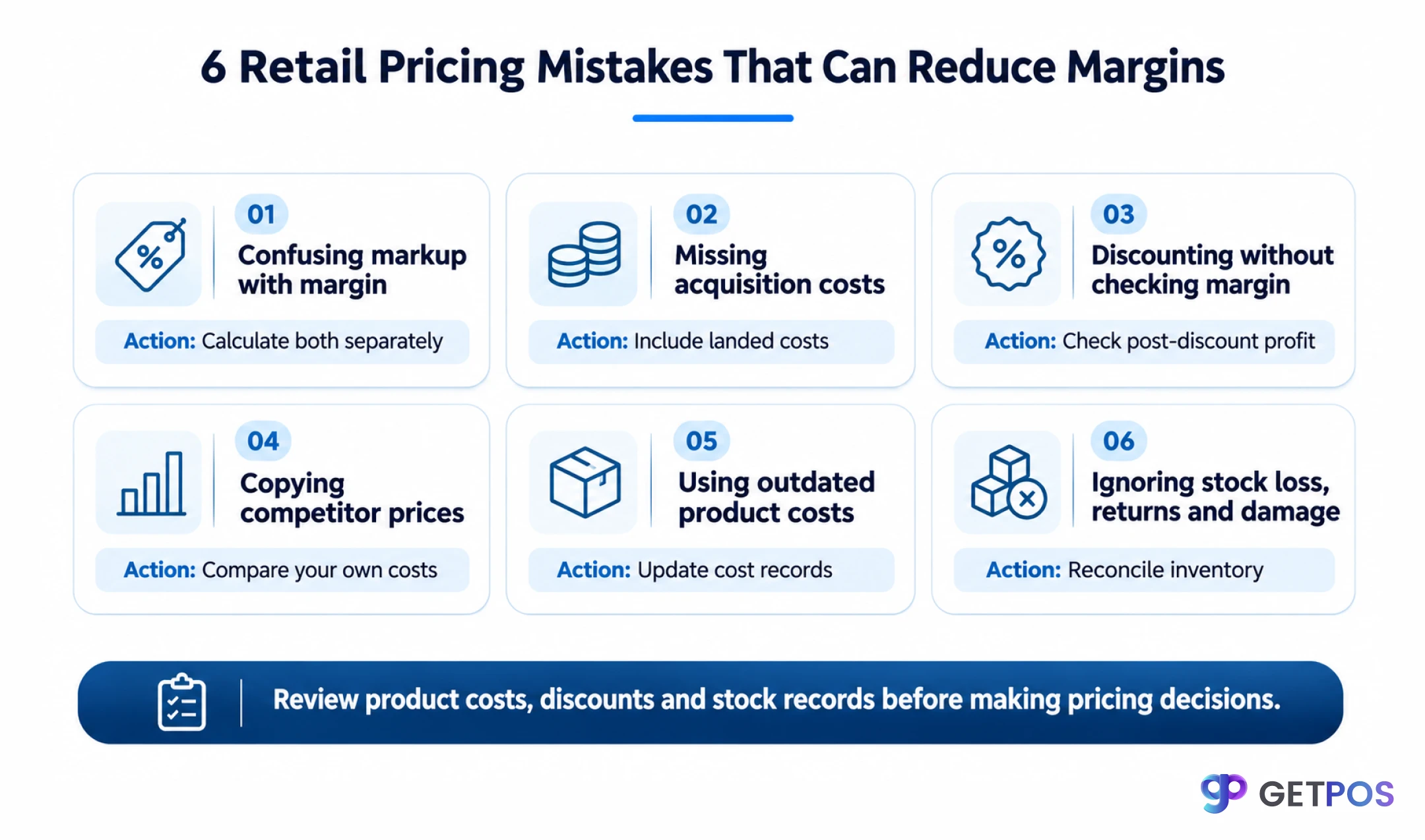
Even a small pricing mistake can affect your overall retail profitability. Here are six mistakes worth checking in your store.
1. Confusing Markup with Margin
Adding 30% to a product’s cost does not give you a 30% margin.
Impact: You may overestimate your gross profitability.
Solution: Calculate markup and margin separately before finalising prices.
2. Ignoring Additional Product Costs
Your product cost may include more than the supplier’s purchase price. Freight, handling, and other attributable acquisition costs can increase the actual cost.
Impact: Your calculated profit may be higher than your actual gross profit.
Solution: Maintain accurate landed cost records.
3. Offering Discounts Without Checking Margins
Suppose you sell a product for ₹1,000 with an ₹800 cost. Now, you offer a 10% discount.
Impact: Gross profit falls from ₹200 to ₹100, and gross margin falls from 20% to 11.11%.
Solution: Calculate the remaining margin before launching promotional offers.
4. Copying Competitor Prices
Your competitors may have better supplier rates or different operating expenses. Copying their selling prices can affect your profitability.
Solution: Compare competitor prices with your own product costs and target margins.
5. Using Outdated Product Costs
Supplier prices can change with every purchase. Using old costs can create incorrect pricing decisions.
Solution: Update purchase prices regularly and review inventory costing records.

6. Ignoring Returns and Inventory Losses
Damaged products, stock shortages, returns, and inventory shrinkage can affect realised profitability.
Solution: Track stock adjustments and reconcile inventory regularly.
Accurate stock records make pricing reviews more reliable. See how Retail Inventory Management Software can support stock visibility and inventory control.
7. How Markup and Margin Affect Retail Pricing Strategy
Different retail businesses have different pricing requirements. A grocery store, fashion retailer, and electronics shop cannot always follow the same pricing approach.
Retail Business | What Should You Consider? |
|---|---|
Grocery Stores | Low-margin products and frequent price changes |
Fashion Retail | Seasonal discounts and product markdowns |
Electronics | Supplier costs and competitive pricing |
Supermarkets | Category-wise gross profitability |
Multi-Store Retail | Store-wise costs and consistent pricing |
Retailers should review product profitability before changing prices or launching promotions. For better visibility into sales trends and category performance, Retail Analytics Software can support more informed pricing decisions.
Explore Retail Analytics Software for sales trends and category performance insights.
8. How Retail POS Software Helps Track Markup and Margin
Calculating product profitability manually becomes difficult when your store manages hundreds of products. The challenge becomes bigger when you operate multiple stores with different purchase costs and sales volumes.
A suitable Retail POS Software solution helps maintain product costs, selling prices, and sales transaction records.
Depending on the platform’s capabilities, retailers can use connected systems to support:
Product cost and selling price records.
Gross profit and margin reporting.
Discount and promotional sales analysis.
Inventory cost visibility.
Product-wise and category-wise performance.
Store-wise sales comparisons.
GETPOS is an AI-based Retail Operating System that connects retail operations, including POS, inventory, and reporting workflows. This connected approach helps retailers access important operational information and make better-informed business decisions.
9. Best Practices for Maintaining Healthy Retail Profit Margins
Maintaining healthy margins requires regular attention to product costs and selling prices. Follow these six practical steps:
Calculate markup and gross margin independently.
Review landed costs and supplier price changes regularly.
Set different margin targets for different product categories.
Check profitability before offering discounts.
Compare product-wise and store-wise gross profit.
Maintain accurate GST, sales, and inventory records.
Additionally, Retail Operations Software can support connected retail workflows and better operational visibility.
10. Conclusion
Understanding markup vs margin helps retailers make better pricing decisions. Markup tells you how much you add to product costs. Margin shows how much gross profit you earn from selling products.
Both calculations are important when setting prices, planning discounts, and evaluating profitability. However, accurate product costs and inventory records are equally important.
If you manage multiple products or stores, better visibility into sales, inventory, and financial information can simplify everyday decisions.
Explore the Retail Operating System by GETPOS to understand how connected retail operations can support better business visibility.

Frequently Asked Questions
Markup measures gross profit against product cost, while margin measures gross profit against selling price. An ₹800 product sold for ₹1,000 generates a 25% markup and a 20% gross margin.
Subtract the product's cost price from its selling price. Divide the difference by the cost price and multiply by 100. An ₹800 product sold for ₹1,000 has a 25% markup.
Subtract the cost of goods sold from selling revenue. Divide gross profit by selling revenue and multiply by 100. This gives gross profit margin. Net profit margin also considers operating expenses and other relevant income and costs.
No. A 30% markup produces approximately 23.08% gross margin. Achieving a 30% gross margin requires approximately 42.86% markup. The difference comes from using different calculation bases.
Divide the markup percentage by 100 plus the markup percentage. Then multiply by 100. For example, a 40% markup equals approximately 28.57% gross margin.
There is no single ideal margin for every Indian retailer. Profitability depends on product categories, supplier costs, rent, discounts, inventory losses, and operating expenses. Retailers should compare margins against relevant category benchmarks.
Discounts reduce sales revenue and gross profit when product costs remain unchanged. Reducing an ₹1,000 selling price to ₹900 against ₹800 COGS reduces gross margin from 20% to 11.11%.
Suitable retail POS software can help retailers maintain product costs, selling prices, and profitability reports. However, features differ between platforms. Check whether the selected system supports your required calculations and reporting.